Introduction to SpatialStudio
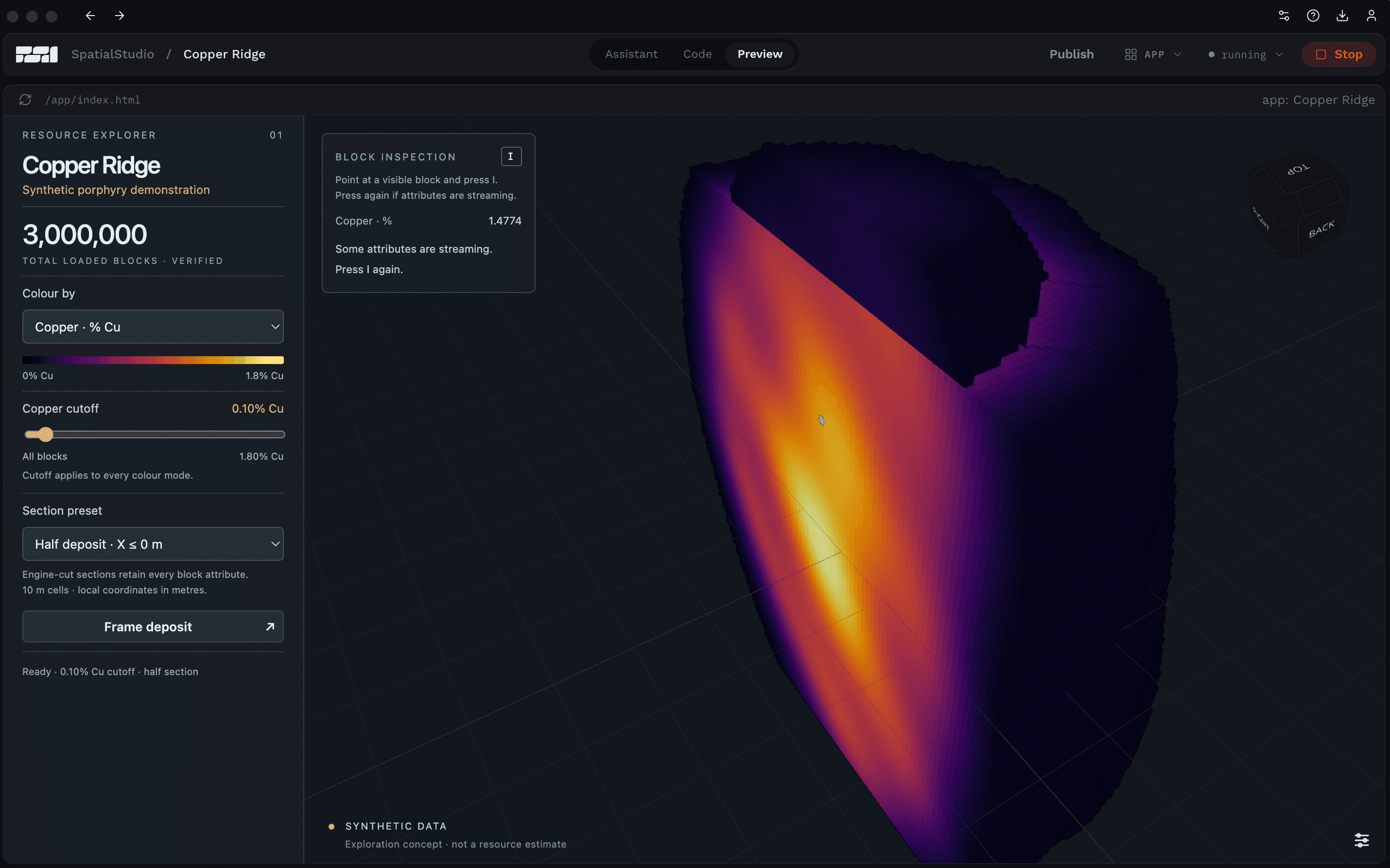
Foresight SpatialStudio enables you to turn an idea into a working spatial application using best-in-class technology for working with 3D and 4D data.

Introducing Foresight Spatial Labs
The team here at Foresight Spatial Labs is behind some of the best technology in the 3D industry for streaming, visualizing, and performing calculations on massive data sets data collected from real world operations and systems. We are excited to begin rolling out a set of new products and offerings that make it easier for more application developers and data scientists to use our tools without requiring deep 3D programming expertise.
AI-assisted coding tools are making it easier than ever for anyone with an idea and domain expertise to create an app or site. We’re seeing a ton of vibe-coded applications appear using common off-the-shelf libraries that may not be best suited for working with reality capture data sets, voxels, or other massive 3D data.
Introducing SpatialStudio for prototyping, developing, and publishing spatial apps
What better way to start putting our tools into users’ hands than to provide an AI-assisted coding tool to give users immediate access to building apps with the Foresight Spatial Platform?
Foresight SpatialStudio enables you to turn an idea into a working spatial application using best-in-class technology for working with 3D and 4D data. SpatialStudio combines Python, ChatGPT Codex, an editor, and a live preview with the SpatialEngine runtime to enable you to prompt your ideas to create apps that directly use our libraries.
Using SpatialStudio, you can create an application, explore and test it, and then further refine your idea, and the app, in the same workspace. Your application’s code and interface are ordinary python project files and you can bring in the libraries, frameworks, and development tools that you already use.
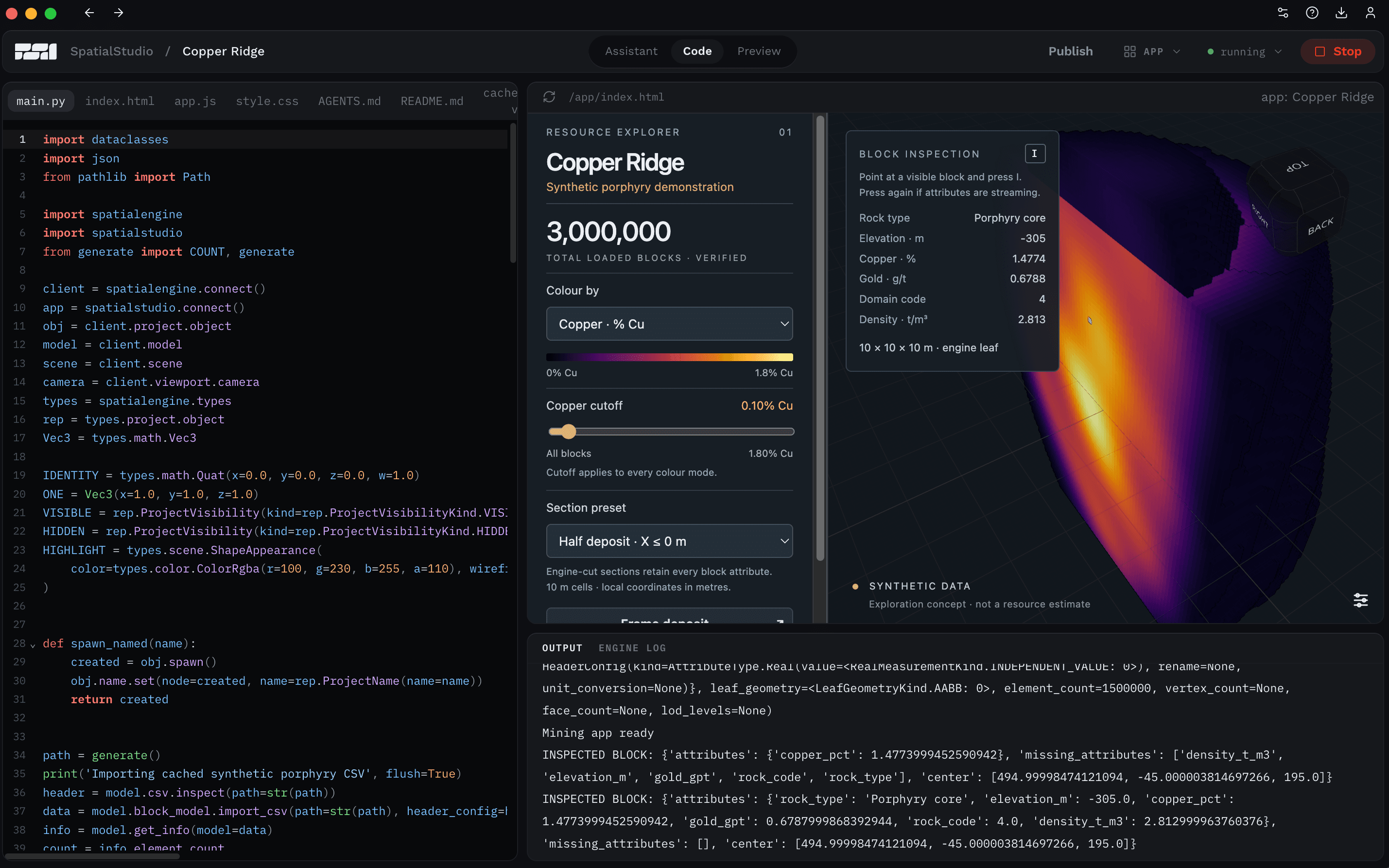
Code and the running application sit together in SpatialStudio, making the result of a change visible.
Do more than just prototype rapidly with AI
A prototype helps you decide what an application should do. SpatialStudio makes that exploration concrete: start from a sample, add a calculation or control, run the application, and inspect the result.
SpatialStudio prepares the Python environment and manages the engine for the running project. The application preview, output, and engine logs are available alongside the code, keeping the development loop close to the behavior you are trying to create.
The integrated coding assistant can help write and revise the application. SpatialStudio uses your installed Codex setup to work on project files, implement engine calls, and build interface controls. With QA enabled, SpatialStudio can also run the application and inspect the preview.
With a simple chat workflow, you can use AI assistance to explore a specific idea and iteratively review each round of output. A request to add a slider, change a visual representation, or expose a calculation becomes a change you can see and exercise.
Develop with your favorite framework
A useful prototype needs room to grow. SpatialStudio projects can use Python libraries such as NumPy, pandas, and SciPy for processing and analysis, alongside a custom web interface built with the framework you choose.
Using SpatialStudio, you can connect familiar frameworks and libraries to high performance spatial tools and behavior. A numerical calculation can produce a model, a control can change input parameters, and the viewport can show updated results. The application's interface and logic, defined by you, determine how those pieces work together.
The project stays in normal files containing its code, assets, configuration, and declared dependencies. You can keep those files in version control, edit them in your preferred tools, and bring the project into an established development process.
Underneath the application, Foresight SpatialEngine provides rendering, queries, and project editing. When shared data becomes part of the application, Foresight SpatialDrive supplies the connected storage, history, and access services.
Publish portable apps
SpatialStudio supports building applications that will be worked on by multiple developers and run by end users. Each application’s front end assets are prepared and published in order to enable a teammate using a compatible SpatialStudio installation to open the project without rebuilding those assets.
For custom distribution, the engine can also become part of your own application packaging and build process. Native applications can use Python or another engine client, while browser applications use the TypeScript and WebAssembly integration. Each route gives you control over the interface and deployment around the runtime.
The project files give you a practical path from an experiment to maintained software. You can share a working version, continue developing it, and choose the distribution approach that fits the application. The sharing guide describes the project and runtime requirements.
SpatialStudio is available as a technical preview for macOS and Windows. Open a sample, change something, and see the result. The quickstart walks through that first run.
Show us what you can do with SpatialStudio!
We’re excited to share our tools with the community. The Foresight Spatial platform is well supported, enables high performance visualization and calculations on massive data sets, and is already used by 1000s of users in industries from mining to robotics.
Get started by downloading SpatialStudio here: fslabs.ca/spatialstudio
We look forward to seeing what you create with SpatialStudio!